Showing posts with label Organization. Show all posts

Monday, March 9, 2015

Math Menu: An Alternative to Math Centers


Have you ever considered using a math menu? I was at my wit's end with math centers when I saw our gifted specialist use a choice menu for a social studies unit and thought, "Could I do that for math?!"  While math centers have value for students, I was struggling to maintain them…making the activities and materials, switching them out, etc. I knew there must be an easier and more efficient way for me that would also meet the needs of my students. That's when I decided to create a math menu and give it a try! 

Our Math Menu is printed on poster paper and is posted in our classroom.

When designing our Math Menu, I wanted the menu to be general enough that it could be used with any math unit so that I wouldn’t need to create or prep too many new tasks. I also wanted to make sure I held students accountable for their work and that they had some kind of product to show for their time spent during Math Menu. The final characteristic I wanted was to make sure there was a mix of open-ended and closed tasks so that no one would quickly do all of the choices and be left with nothing else to do.

After the students have learned all of the objectives for a unit, we will usually do Math Menu for about five to seven days before a test. While students are participating in Math Menu, I pull small groups by objective based on formative assessments. I LOVE the structure of a menu vs centers because of flexible grouping…I can pull groups whenever I want, for however long I want because I am no longer tied to the rotation of a center schedule. Students may also be in more than one group. For instance, if Michael needs support with adding coins and measuring length, he will see me with the adding coins group and again for the measuring length group. The part I have to be careful about is making sure I’ve seen every student so that no one is left out or left doing Math Menu for too long. 

At this point, I have been using Math Menu for about a year with both my students from last year and my current class. Basically when it's time for Math Menu, I'll say to my students in Oprah-style, "It's time for Maaaaaaaattttthhhhhhhhh Meeeennnnuuuuuu!" and they'll say, "YAYYYY!" Then I tell them something like, "I need to see the following students at the carpet for adding double digits...and everyone else may go to their choice for Math Menu and gather what they need." I will work with a small group from anywhere to 5 to 15 minutes depending on how they are doing. Sometimes a few students in the group catch on quickly so I'll send them back to Math Menu and keep working with those who need more intervention. When I'm done working with a group, I'll call for the class' attention (we use "Give me 5") and give the names of the next group of students I want to see. I will also periodically get up to see what everyone is working on around the room too. At the close of Math Menu, everyone helps clean up and I check the Check-in Table (see below). 


Along the way I have added some features to make Math Menu successful for my students and I:


Signs
Signs help keep us organized and give the students a reference for what to do. 


Check-in Table
Students shade in the amount of money their choice costs. This gives me a quick glimpse at who is accomplishing their work. This table was printed on poster paper, laminated, and is posted on an easy-to-reach cabinet in our classroom.


Checklist, Templates, and Pre-Cut Game Cards for Invent a Game
All of these items help the students prioritize and make the best use of their time when they are making a game. I found game templates for free for Monopoly, Candyland, etc. HERE and had a parent volunteer make blank cards and bag them. 


If you are interested in my Math Menu and management pieces, check it out in my TpT Store! 

Wednesday, March 4, 2015

Students as Authors: Writers' Workshop Part II


Most of our writers’ workshop is spent writing, of course! Planning > First Draft > Edit/Revise > Publishing. These are the stages my students follow for each writing piece. They keep their work in a writing folder and move it from magazine box to magazine box based on each stage of the writing process (idea source from The Superlative Six). Nearly all of my Writing Process Labels have become detached from our boxes but if you're interested in seeing the labels, they are available for FREE in my TpT store. The students usually do two to three pieces each quarter. We spend A LOT of time on each piece to really make it quality. I am a big fan of Thinking Maps and have the students use them for the Planning stage. Sometimes I create my own Thinking Maps templates and sometimes I find JUST what I'm looking for from Lisa Lizak and Beth Wright or Read, Write, Think (click links for free Thinking Maps!). 


During the First Draft stage, students use their Thinking Map to compose their writing on special draft paper. If students need me, they sign up for a writing reservation (made with Google Forms) on the computer. I will also pull small groups based on what I see. 

Writing reservations also come in handy for the Edit/Revise stage. I love the writing reservations because it gives me a record of what students need and who I’ve met with but the best part is, the students do all the work! They love going to the computer and completing the writing reservation form. It makes them feel so fancy! I keep my iPad at my fingertips and have the results of the writing reservation form up on the screen and it updates in real time as the students submit a reservation. 

Student View of Writing Reservation                          Student in Action                      Teacher View of Writing Reservations


One of the most overwhelming parts of writing for me used to be editing student work so I then I got smarter and started having the students do most of it. It's a win-win for both the students and I because they become master editors with all the practice (I also like to think that maybe they put more effort into their first drafts so then they don’t have to correct as much, wishful thinking?) and I don’t have to spend hours after school editing every single error. 

During the Edit/Revise stage, I’ll pull a small group based on the reservations. They bring a marker, clipboard, and their first draft to the carpet. I keep a dry-erase board with me to do brief lessons based on their errors. I will instruct the students to check every sentence for a capital letter, punctuation, etc. and they use editing marks to make the corrections. As the year progresses, I add additional steps during the Edit/Revise stage, such as pick a word to find a jazzy synonym for, check for contractions, etc. During the final part of this stage, I pair the students up and they read their writing aloud to one another while I rotate around and listen in. The purpose of the partner read aloud is for them to give each other compliments and suggestions. Two brains are better than one, right?! They also catch a lot of errors once they hear how their writing sounds out loud.

Finally, the students move to their final draft! They write their story on loose-leaf notebook paper (it takes them forever to remember what side the holes go on! Does anyone have any tricks for that?) and sometimes they make it into a book! Every other month I organize an event called Quill and Scroll with my colleagues where five students from each class are invited to share a "published" piece of writing one evening after school. Families are invited, the kids dress up...it's real special! Every student in the school gets invited to at least one Quill and Scroll during the year. Stay tuned for a more detailed post on how to organize your own Quill and Scroll!  

Thursday, August 15, 2013

Teacher Week '13: Now Teach! Organizing for Instruction


Five of My Tried and True Organizing Tips and 
Why They Are Must-Dos in the Classroom 
{freebies included}
 
1. Calendar Book Ring System

I have a thing for book rings...They make it SO EASY for my Calendar Leaders (one of my classroom jobs) to manage calendar.  No more losing or searching for pieces, just flip the pieces!! You can get this set of calendar pieces for FREE in my TpT store. 

My Calendar Leaders (two students) lead the class in calender everyday...it takes less than five minutes and is a great way for the students to review specific objectives (that they may have trouble with) everyday. The Calendar Leaders also make calendar interactive by having the rest of the students echo what they say. For instance, the Calendar Leaders will say, "Today is Tuesday comma September 3rd comma 2013 period," and then the other students echo. The echoing is a great way to keep all the students engaged.


2.  Essential Questions Book Ring System

Like I said, I have a thing for book rings...all you have to do is flip! No more writing and erasing the essential questions/objectives on the board! Perhaps you keep your posters in a binder and switch them out with every unit and that's cool too! Not only are the book rings super easy and time efficient but they are great for content integration since you have easy access to all of the essential questions. These pages are for the 2nd grade Standards of Learning (SOL) in Virginia and you can get them for FREE [here], [here], and [here] in my TpT Store.


3. Student Work-in-Progress

I L-O-V-E pocket charts too! This pocket chart was a lifesaver last year when it came to managing students' work-in-progress. Each student is assigned a pocket and they  put any unfinished paper-based task in their pocket. Lost papers are no longer an issue (I have a "no loose papers allowed in desk" policy) and the whole "Whose still working on that?" is an easy problem to solve!


4. Homework Folder Pocket Chart

One can never have too many pocket charts, right?! This pocket chart is near the classroom door so when students enter the classroom in the morning they put their homework folder and/or Porter Pocket (folder that goes home once a week with student work) in the pocket chart. Again, each student is assigned a pocket so it's a great way to check attendance and see who is being responsible with bringing their folders back to school. What I love the most about it though is it makes my job super easy (every minute counts!) to collect anything from their folders AND students are not bombarding me in the morning with notes, forms, etc.


5. Why Have a Leveled Classroom Library?

I REALLY don't like gathering books for Guided Reading...there's not enough books for the group or I can't find books that I feel passionate about the students reading. So I leveled my classroom library. The students are given the levels they may "shop" for and they use those books for our Reading Workshop. Not only does this help me out but it works out better for them too because they're more engaged and have ownership over  what they're reading. The only time I assign a specific book is sometimes for a Book Club or content related study.


6.  Math Manipulatives: Easy Access and ALL-IN-ONE Spot
Needless to say prepping and distributing math manipulatives can be time consuming! I don't know why I didn't do this sooner...put all of the math manipulatives in one spot that is easy for the students to access. Since the manipulatives are easy for the students to access, I can put them in charge of gathering what they need. For instance when it's time for small group math instruction, I can tell my small group to get twenty unifex cubes instead of them waiting for me to pass the unifex cubes to each of them. 

The small things can make a big difference! 


Thanks for visiting! Hop on over to Blog Hoppin' to check out more ideas!

Monday, August 5, 2013

Monday Made-It: Reading Workshop Assessment + Lesson Planning Pages

I'm linking up with Tara at 4th Grade Frolics for...


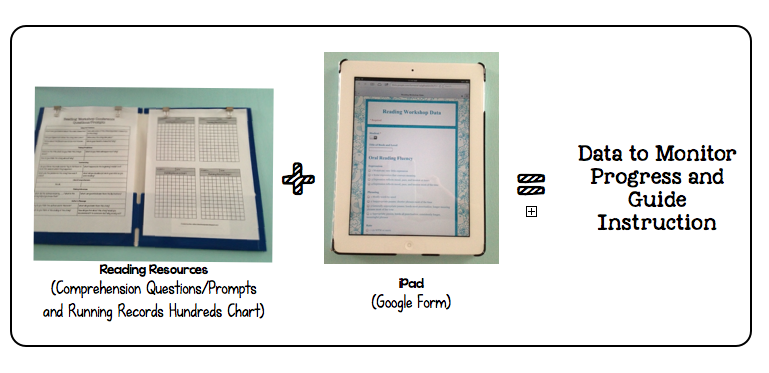
Last summer I created a fancy, schmancy system for keeping data for reading and writing based off of the CAFE book. Then the school year started. I love the CAFE book but all the different records became too overwhelming for me. Then I tried a big ole binder with a tab for each student but I couldn't manage that well either. Finally after lots of thinking, talking, and searching I have a new system to try and am hopeful that it's going to be magical! 


Guided Reading/Reading Workshop Assessment

 1. Materials:
1. Reading Resources (FREEBIES in my TpT store HERE and HERE)
2. iPad or computer 
That's all you need...easy peasy! 


2. Assessment:
Oral Reading Fluency       


Reading Comprehension
Oral Reading Fluency: 
1. Use hundreds charts for Running Records.
2. Record student's performance in Google Form (based on DRA2). 

Reading Comprehension:
1. Use Comprehension Questions/Prompts to guide conference with student.
2. Record quality of student's responses in Google Form (based on DRA2)

No more clutter of papers to worry about! 


3. What now?:
Google Sheets automatically orders the data by date/time but you can order the students by number by clicking the student column and ordering from A-Z. This way each student's data will be grouped together and you can more easily see individual progress.

1. Analyze data in Google Spreadsheet and use to guide instruction!

Grouping students by strategy is made easy!


Would you like to try out this system too? Here's where I found inspiration and tutorials:
Stephanie from 3rd Grade Thoughts
Farrah from Think*Share*Teach
Karyn from Doing the Daily 5!


One more thing...Planning Pages!
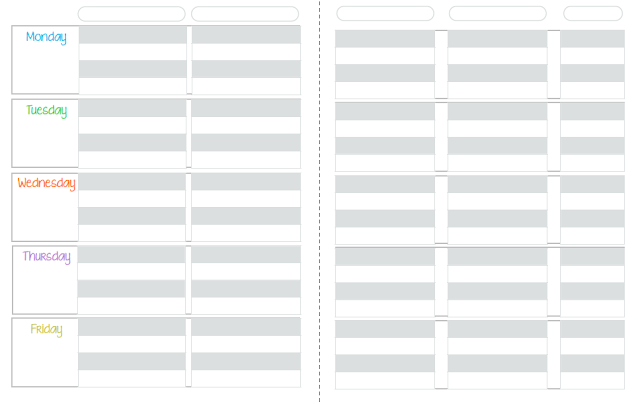
I LOVE to be organized but I was a mess this past year when it came to keeping legible plans. Perhaps at some point I'll make the move to digital plans but for now, I'll use my new planning pages. Download them (click image) for FREE on TeachersPayTeachers!


Happy Monday!

Monday, August 13, 2012

Monday Made It Linky Party (with freebies!)

Happy Monday to you, friends!! I'm back from my weekend hibernation and ready to be a busy beaver again. I'm looking forward to meeting with my two team members this week and am eager to learn from them.


My favorite part about Mondays is, of course, Tara's Monday Made It Linky Party! Be sure to join in and/or check out all the awesome projects.


I have four projects (with freebies) to share with you:


1. Porter Patriot of the Week


What student doesn't love to be honored with special activities for a week?! I hope that implementing Porter Patriot of the Week (Porter is my school's name and our mascot is the patriot) will create a sense of community as we celebrate each student. The display in the classroom that I created is where the Porter Patriot of the Week will showcase photos of his/herself. I want to implement Beth Newingham's star student activities:

First, she gives the parents a star of the week schedule for the entire year.

On Mondays the student brings in three special items and photos to share with the class.

On Tuesdays the student reads his or her favorite book to the class.

On Wednesdays the parent writes a letter to the class about a special story involving their child.

On Thursdays a special guest (parent, relative, etc.) joins the student for lunch.

On Fridays the student is recognized by their classmates...I want to do something like [this pin] where the students write compliments to the Porter Patriot.

You can download a Star Student of the Week sign for free in my TpT store.

Be sure to check out Beth's class website to read more details about implementing star student of the week. She has other great resources on her class site too.


2. Boggle

Boggle has been everywhere (it seems)! There have been so many different teacher-created boards like [this one] and [this one] and [this one]...I needed one that was small because wall real estate is limited in my classroom so I utilized the side of my filing cabinet. I don't have a picture of how I keep my magnetic letters organized but it's exactly like [this pin].


3. Parent Volunteer Tote


For my parent volunteers that visit the classroom, I want to have materials handy just for them (Thanks for the suggestion, Nikki!). I was given this tote as a gift (Thanks, Hillary!) and it works perfectly for holding school supplies. The blue paper tray it's sitting in will hold any materials, directions, etc. for the parent volunteer. You can download a blank tote tag for free in my TpT store.


4. Book Ring Calendar

I wrote about my calendar last Monday but have since updated its display. I think it looks more cohesive now. You can download my calendar file for free in my TpT store.


I posted about other projects (freebies included) during the weekend too. Click the pictures to learn more. :)


Have an excellent week!! :)

Saturday, August 11, 2012

Classroom Update: Clutter-Free Classroom and Ladybug's Teacher Files Inspired


ClutterFreeClassroom

You know Jodi at the Clutter-Free Classroom, right? What am I saying, of course you do! I don't know where I would be without her and her blog. She thinks of everything!! As I've been a busy bee setting up my classroom (I'd sleep there if they'd let me but my dog might get lonely at home) I am constantly consulting Jodi's blog and implementing her suggestions so that my classroom will run like a well oiled machine and student learning can excel! So on that note, here are three features of my room inspired by Jodi. :)

1. Work In Progress Chart (view Jodi's post by clicking [here] )


Students will place their "work in progress" in their assigned pocket on the pocket chart. I've decided to use this pocket chart because it will help all of us stay organized...I will be able to easily see and check the status and quality of their work and the students won't lose their work in the abyss of their desk. I like calling this chart "work in progress" rather then "incomplete work" because I want the main focus to be on producing quality work, not just completing an activity. 


On Fridays, if a student has work in progress then they will find a ketchup card on their desk when they arrive in the morning as a friendly reminder to check their pocket. If a student does not have any work in progress then they will find a pickles card letting them know they may pick from a list of extension activities. The extension activities will be listed on the pickles board (I made it out of dry-erase poster board) above the pocket chart. The ketchup and pickles concept was inspired by Teach-A-Roo and you can download the cards for free in my TpT store. 


2. Communication Folder and Porter Pocket Chart (view Jodi's posts [here] and [here])


Aren't pocket charts great (sorry about the washed out picture)?! When students arrive in the morning they will place their Homework Folder in their assigned pocket. This system also shows me who is at school and who is absent. They will also keep their Porter Pocket here (weekly folder that is used to send student work, etc. home...Jodi calls it their Thursday Folder because it goes home on Thursdays). I wasn't planning for this to be on wheels but I actually really like the idea...I can wheel it near the door in the morning so that I can greet students and check their folders at the same time and then wheel it out of the way during the day. Then when students are packing up at the end of the day, it can be wheeled to the front of the room where they can easily pick up their folder(s) to take home.

I purchased this pocket chart from MPM School Supplies, and they were wonderful!! I highly recommend them! When I received the pocket chart, the pockets were not all the same size so I contacted them to see if my chart was a manufacture's defect...turns out it was! MPM sent me a new pocket chart, free of charge, and they let me keep the defect one too. Awesome customer service!


3. Anchor Chart Designated Area (view Jodi's post [here])


Jodi wrote a great post for supporting anchor charts so I'm not going to go into my love for them. I have mine set up (as shown with the blank paper) with jumbo push pins to hold the two book rings. As the students and I create anchor charts we will just add charts to the book rings. I'm hoping the book rings will make it easy to flip between charts instead of having to switch them out.

You may also notice the lovely alphabet in this photo created by Kristen from Ladybug's Teacher Files. :)  You can download my Anchor Charts sign, which coordinates with Kristen's bright and CLEAR decor, for free in my TpT store (I outlined the letters in black marker after printing).


Speaking of Kristen, she recently updated her CRAFT Board....I absolutely LOVE it. I love it so much that I took down the CAFE Board I had set up just a few days before (also from Kristen) and put up her new signs.

My board from a few days ago:


My updated board!!:

Don't you just love the bright colors?!! The border is from the $0.88 section of Walmart. I had to move CRAFT to the dry-erase board because all five letters couldn't fit on the bulletin board where CAFE had previously been. Click on the picture to download Kristen's files for free.

Phew, thanks for reading!! I'm going to go sleep for the next 48 hours so my batteries can recharge. I'll be back for Tara's Monday Made It. Have a super weekend!!!!!!

Monday, August 6, 2012

Monday Made It Linky Party

Hope everyone had a relaxing weekend!!


I'm off to continue setting up my classroom but before I do, I have three projects to share with you for Tara's Monday Made It Linky Party (click her button above to join in and/or view other super projects)!


1. Where Am I Board: I saw this on Pinterest last week and immediately went to make my own. I purchased the dry-erase magnetic board from Walmart ($6), the gems from Dollar Tree (hot glued magnets on the back), sparkly ribbon from Walmart, and used clear labels (my new best friend). I want to hang this by the classroom door but I'm not sure how to hang it so it will stay on the cinder block walls. I may experiment with the 3M tape it came with or hot glue a ribbon handle but do you have any other ideas?


2. Wrapping Paper Curtains: I was inspired by a pin from School Girl Style to make these wrapping paper curtains with pattered packaging tape as a border. I don't think this picture does them justice but they really warm up that corner of the room. I purchased the wrapping paper from Target and selected this particular paper because the animals relate to the second grade curriculum. My goal is to integrate as much as possible.


 3. Calendar: Now that I'm looking at this picture, I think the calendar area needs a border (or a few) to be visually organized, and I need to get more magnetic numbers. Nonetheless I was inspired by Mama Jenn's book ring calendar system to create my own. I love that she put all of the calendar pieces on book rings (my other new best friend) so that pieces don't go missing and it's easy and efficient to change anything. I used:

magnetic push pins from Walmart

magnetic numbers from Amazon (I chose these particular magnets because the entire back is covered with a magnet, also you're going to need at least two containers) 

magnetic base-10 blocks (it's that little orange ones piece on the bottom right, and I can't remember where I got those from)

I want to use calendar as daily place-value practice but may add other components depending on the needs of my students. You can download my calendar pieces from my TpT store for free. Some of the pages need to be printed more than once so I've labeled those particular pages with their multiple uses. Enjoy!

Hope you have a wonderful week! Remember to click Tara's button!

Friday, August 3, 2012

Double Whammy Linky Party

What a week! I hope you've been having fun setting up your classroom/preparing for school and also enjoying the summer!! I've been having so much fun setting up my classroom that I never want to leave! Everyone at school has been so helpful and welcoming...I know I'm in the right place. :)

I'm going to do a double wammy linky party tonight! I hope that's okay. :)

Oh' boy fourth grade
 I am participating in Farley's Currently. Below that I give you a glimpse into my classroom for Brigid's Classroom Tours where you'll see how I've used my Back 2 School Must Haves. A double whammy!


A few snapshots to share:


These two photos were taken at the end of day one. One of my classroom parents, who is also a colleague, helped me arrange the furniture, hang the two garlands from the ceiling, and fix black twin flat sheets (can be purchased separate from the fitted sheet and pillow case from Walmart for under $5) on most of the bulletin boards.

See the cabinets in the back? On Tuesday and Wednesday, I spent time going through everything that was in them and organizing it all. I want resources and manipulatives to be easily available. Jodi at Clutter-Free Classroom would be pleased because now the cabinets and drawers are clutter-free!! I don't have a before picture (it was definitely not a pretty sight) but I do have two after pictures:


Clear labels are my new best friend. I like them because they (almost) blend in, I can use my favorite font on them, and I don't have to use tape (my frenemy). I have the address label ones (as shown on the drawers above) but I also have circle ones. Here are the circle labels on the students' book bins (Target Dollar Spot):


While organizing the cabinets, I found a pair of giant googly eyes and knew EXACTLY where to put them (inspired by a pin)...
Isn't he cute?!


There are more storage areas in the room that I need to investigate but I wanted to setup a few recently laminated items:

Inspired by another pin, I knew I had to create this when I saw it on Pinterest. Doesn't it send a powerful message?


I am also a big fan of those 3M hooks and book rings. They are great for hanging stuff!! AND they seem to stay on the cinder block walls. You can read more about my indoor recess choice board in a previous post.


This probably looks familiar, or exactly the same :), to Kristen's board at Ladybug's Teacher Files. I love her board and didn't want to change a thing about it. I used ribbon from Walmart for the border (this board took almost the whole roll).


Stay tuned for some projects (inspired by this pin and this pin) for Monday Made It!!

Link up with Farley and Brigid's parties, and I hope you have a relaxing weekend!!!

 
Site Design By Designer Blogs