Showing posts with label assessment. Show all posts

Sunday, April 19, 2015

Paint, Glitter, and Egypt, Oh My!: An Introduction to Ancient Egypt


My students thought it was the best day ever when they saw that we'd be using paint and glitter. It all started when I came across a map of Africa that was in my drawer from a previous teacher (originally from our gifted specialist). This was not just any map though...there was sand, easter grass, and paint on it! I didn't have all of those materials handy but improvised with paint, glitter, and yarn and knew this would be a perfect way to start our unit on ancient Egypt developing a foundation of the environment and geography of Africa.

The next day I started this activity by giving my students a look at Africa on Google Maps. I asked the students: What can you tell from looking at Africa? What kinds of habitats cover Africa? Where is Africa located in relation to the other continents? After this brief inquiry session, I shared some fun facts with them about Egypt and Africa including the importance of the Nile River. 

Then came the most fun part….paint and glitter! I had already precut Africa and outlined Egypt for my students so they started by glueing Africa to their blue paper, writing their title, map key, and compass rose. While they were setting up their map, I simultaneously squirted paint on the appropriate sections of their map to represent the different habitats. They used q—tips to spread the paint and glued red yarn for the equator. To complete their maps, they used blue glitter for the Nile River and added gold glitter to the desert area. For accountability, my students completed the exit ticket, which I counted for a grade. If you're interested in my exit ticket, it's available for purchase in my TpT Store. 


Happy painting! 

Monday, March 30, 2015

Do You Kahoot?


What was originally intended for trivia-players at pubs in London has been enthusiastically taken over by students and teachers...do you Kahoot?! When using Kahoot, be prepared for your students to go...well...a LITTLE CRAZY! They will be engaged. They may scream from excitement. Yes, they will be learning!

Kahoot is a game-based formative assessment system that is FREE and can be used on ANY device (desktop computer, laptop, iPad, iPhone, iPod) as long as it has an Internet browser and connection. You basically create a quiz, which you project for the students to see, and then the students' devices become the game controller (think the new and improved clickers).


It gets better...for the students to participate in the Kahoot, they just have to enter a game code at kahoot.it. Then while the students are signing in, you can embed a YouTube video to keep them occupied while they are waiting. Once the Kahoot starts, the questions are timed (to a setting you've selected), students will get feedback immediately following each question (once everyone has submitted their answer), and the top five students with the highest score will be displayed following every question (motivation to the max!). After the Kahoot is completed, you can download the students' results to your desktop or GoogleDrive. For a tutorial on how to make your own Kahoot visit this link. You can also use Kahoots that other people have made available for public use.


To see what Kahoot is all about, take a look at one I created for my 2nd graders on Academic Vocabulary for Adaptations. Before the Kahoot, students and I had a discussion about adaptations and created a class Circle Map about hibernation, migration, camouflage, and dormancy. Then my students did the Kahoot on Academic Vocabulary for Adaptations to give me an idea of who's got it and who doesn't. The Kahoot I created has a song about adaptations playing as the students are signing in and has five questions with pictures. My students get VERY EXCITED so I do a Countdown to Calm ("3-2-1-0 and calm") after each question. It helps. Sometimes. ;)

Happy Kahooting!

Monday, August 5, 2013

Monday Made-It: Reading Workshop Assessment + Lesson Planning Pages

I'm linking up with Tara at 4th Grade Frolics for...


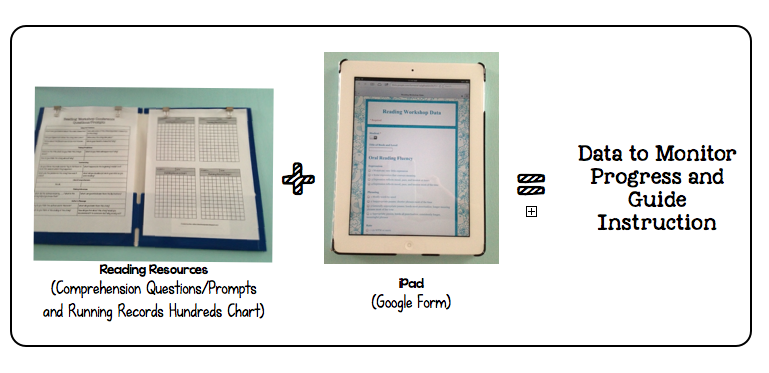
Last summer I created a fancy, schmancy system for keeping data for reading and writing based off of the CAFE book. Then the school year started. I love the CAFE book but all the different records became too overwhelming for me. Then I tried a big ole binder with a tab for each student but I couldn't manage that well either. Finally after lots of thinking, talking, and searching I have a new system to try and am hopeful that it's going to be magical! 


Guided Reading/Reading Workshop Assessment

 1. Materials:
1. Reading Resources (FREEBIES in my TpT store HERE and HERE)
2. iPad or computer 
That's all you need...easy peasy! 


2. Assessment:
Oral Reading Fluency       


Reading Comprehension
Oral Reading Fluency: 
1. Use hundreds charts for Running Records.
2. Record student's performance in Google Form (based on DRA2). 

Reading Comprehension:
1. Use Comprehension Questions/Prompts to guide conference with student.
2. Record quality of student's responses in Google Form (based on DRA2)

No more clutter of papers to worry about! 


3. What now?:
Google Sheets automatically orders the data by date/time but you can order the students by number by clicking the student column and ordering from A-Z. This way each student's data will be grouped together and you can more easily see individual progress.

1. Analyze data in Google Spreadsheet and use to guide instruction!

Grouping students by strategy is made easy!


Would you like to try out this system too? Here's where I found inspiration and tutorials:
Stephanie from 3rd Grade Thoughts
Farrah from Think*Share*Teach
Karyn from Doing the Daily 5!


One more thing...Planning Pages!
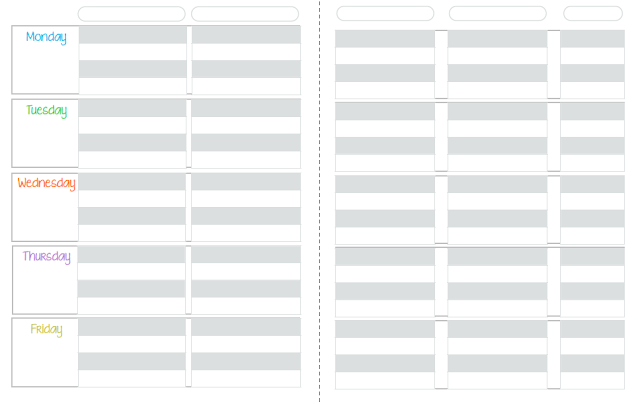
I LOVE to be organized but I was a mess this past year when it came to keeping legible plans. Perhaps at some point I'll make the move to digital plans but for now, I'll use my new planning pages. Download them (click image) for FREE on TeachersPayTeachers!


Happy Monday!

Sunday, July 29, 2012

Managing the Literacy Block (Part 1)

I recently discovered this amazing blog:

The Differentiation Destination

It's a collaborative blog on best practices for differentiating instruction (based off Dr. Carol Ann Tomlinson's work). The four teachers behind this effort just created this blog in July, and I can already tell great info and ideas are going to come from them!

I was in the midst of figuring out how to structure my literacy block with the CAFE and Writers' Workshop when I started feeling SUPER OVERWHELMED...reading conferences, writing conferences, small group (or strategy groups) instruction, whole group instruction, assessments, mini-lessons... my brain was overloaded. So I took a break and stumbled upon a post on flexible groupings from The Differentiation Destination. This post really spoke to me. After reading it, I got the inspiration I needed to put the pieces of the puzzle together. And now I'm ready (and a little afraid) to share it with you. :)

First of all, two of my biggest questions this summer have been:
1. How am I going to manage reading and writing (and math but I'm still working on that one)?
2. How am I going to meet the needs of 27 second graders?


I know many of you have been reading the Two Sisters' CAFE and Daily 5. Both books are such a great resource! I am also a fan of the books below too.


Product Details
Product Details Product Details 


During student teaching I had a binder, like the Two Sisters suggest, and I used elaborate charts and graphs from The Next Step in Guided Reading (I should have read The CAFE Book more carefully because they warned about elaborate charts). I found that I had trouble managing a binder (it just got too crowded) so I have taken the bare necessities and parts from each of these resources to create a system of individual, small, and whole group instruction that will hopefully work for me and my students. As for centers, I'm not going to do the exact model of Daily 5 but I'll post more about that at a later time (you can view my center board here though). It might be too much or not enough but I won't know for sure until I actually meet my students and get in the classroom! Nonetheless, I like to be prepared and would like to share my plans with you anyway. :)


Here is my tentative weekly literacy schedule:
note: to the right of any slashes is what I'm doing with selected students and to the left of any slashes is what the rest of the students are doing

The Meek Moose was recently talking about baby steps and that's what I need to take when introducing all the components of the literacy block to my students.The CAFE Book and Launching the Writers' Workshop give great suggestions on how to get started...the Two Sisters recommend not even starting strategy groups (groups based on need not ability/level) until mid-October. A lot depends on my students too, who I am anxious to meet!


Here is how I will stay organized:


I am going to use magazine boxes (Ikea) and file folders (Target). The pictures above are my reading files and the boxes they are kept in (I have my writing documents set-up the same way). Like I mentioned earlier, the binder didn't work for me but if it works for you, you can easily adapt these files into sections of a binder.


Box 1, Individual Instruction: will house the conference schedule file with (1) reading conference appointments and (2) keeping track form. Each students' reading conference file will also be in this box. I'd also like to put some kind of helpful conferencing resource on the left side (the side that is currently blank) of the student conference form.


Box 2, Strategy Group Instruction: will house file with (1) reading strategy group appointments and (2) reading strategy group lessons. Materials for strategy group lessons will also be placed in this box.


Box 3, Whole Group Instruction: will house file with (1) weekly overview of whole group reading mini-lessons and (2) plans for mini-lessons.  Materials needed for whole group lessons will also be placed in the box.


You can download all the labels and documents (both reading and writing) in my TpT store for free.


If you are interested in learning more about each of these documents, stay tuned for Managing the Literacy Block (Part 2) where I will go into more detail about how I am going to use them, etc. If you have any questions, leave me a comment, and I will try to answer it in my post. :)

Thursday, July 19, 2012

App Happy Linky Party

I'm so excited that Hope King at 2nd Grade Shenanigans is having an App Happy Linky Party (love the Book Retriever app she posted about!) because over this past weekend I was searching for apps to use with my iPad in the classroom. Click Hope's button to check out other apps that make teachers happy!

Second Grade Shenanigans


Here are a few apps I want to try out in the classroom and thoughts on how to use them:
1. Evernote (free): You can create files of digital notebooks for anything and everything. I want to create a digital notebook for each student and have the notebook serve as an e-portfolio. You can upload pictures of student work, use the audio feature to record a student reading, etc. Wouldn't this be great to show parents at conferences? Soaring Through Second Grade wrote a great post on using Evernote too.


2. Penultimate ($0.99): An amazing handwriting app (the best on the market I've heard)! You can use your finger or stylus to write notes or draw pictures. Penultimate is owned by the Evernote people so for example, if you write anecdotal notes about a student, you can easily send it to that student's notebook in Evernote. I also want to use this app in place of an easel during small group work. If I didn't have this app, I would only be able to type any kind of notes, and I'd rather be able to write them.


3. Show Me (free): An interactive whiteboard app. You can create (and watch) tutorials on anything! The app has a record-voice over feature too so for example, you could (or even the students could!) make a tutorial on how to do double digit addition with step-by-step visuals while also giving an explanation. This could be used as a student assessment. Or you could post your Show Me on your class website for students to review material at home.


4. Puppet Pals (free): A super fun animated movie app (it's won an award too)! I learned about this app at a conference in June from a third grade teacher. In his classroom, he had the students take stories they had written and turn them into short animated movies. He said his students' writing improved dramatically...their stories became more interesting because when creating the movies they needed to have included dialogue and more details in their writing. This app also helped with fluency because students were reading aloud and using expression to, again, be more interesting. You can upgrade to Puppet Pals Director's Pass ($2.99) for a lot more characters and features. I can't wait to experiment with Puppet Pals with my second graders!

I'd love to hear any other ideas you have with using these apps! :)


Sunday, March 18, 2012

Who loves data?

I do! This has been one of my biggest goals this semester- keeping track of student progress. Not only am I nerd about making organized charts but I love seeing evidence that the students really are learning!

So far, I have a Guided Reading and a Guided Math data binder. I LOVE doing small groups because I feel the small group setting really helps me reach the students better compared to a whole group setting. I still do whole group activities, especially for the introduction of a topic, but then I pull small groups. When I am working with small groups the remaining students are doing Daily 5 during Guided Reading and Math Daily 5 during Guided Math.

I determine the groups for Guided Math based on a pre-assessment (given on Fridays to help me plan for the following week), and I also give exit tickets (formative assessment) throughout the week. For Guided Reading, the groups have been set-up by my Cooperating Teacher based off an assessment called PALs that we have in Virginia.

I still need to develop data sheets for Writers' Workshop so if you have any advice about that I'd love to hear it!

Guided Reading:
Jan Richardson's Next Step in Guided Reading and the two sisters' CAFE have been my bibles! They have given me great direction in what to look for when students are reading and how to help them. I copied a few of the resources from these two books to put in the front of my Guided Reading binder so I can easily refer to them if necessary during Guided Reading.

 Small Group Reading Sheet:
 

Two samples of how I've used the summary section:


Individual Student Reading Record:
In addition to the group data, I will pick one student during a session to record individual progress. This sheet is mostly comprised of a resource from The Next Step in Guided Reading  but I added the goal and strategy section, which I saw in CAFE. I've uploaded both of these reading group data records to Google Docs for you!


For Guided Math:
I keep a formative assessment record, which I have previously posted about. I also keep a small groups data sheet (similar to the reading groups sheet) where I record anecdotal notes and a brief summary of what the students and I did.

 Small Group Math Sheet:
Observation Tasks Record:
Next, I keep an observation task record with individual students' conference sheet. For the observation tasks, I meet with one student at a time for about 2 to 3 minutes and give them a short task do. I have them explain their thinking aloud and justify their answers (I record their responses and/or any notes that I want to remember on the conference sheet). This brief one on one time is very telling! Another great opportunity to clarify students' misconceptions.


 Sample observation task the students did with Judy Clocks:


Individual Math Conference Sheet:
 
Here are two samples of what I recorded for these two students' conference. I write a "p" if I prompted them.


I have uploaded the math small groups data record, the observation tasks record, and math conference record to Google Docs for you! Enjoy!


Friday, March 16, 2012

Fantasy and Realism

Happy Friday, Friends!

Did you catch any leprechauns today? We didn't but the leprechaun did visit our room...chairs and desks were turned over, toilet paper was thrown about, gold coins were dispersed across the room, and the toilet water was green!

I want to share about the comprehension strategy we focused on this week- classifying fantasy and realism. To introduce the topic, I brought out my magic wand and asked the students if magic wands are make believe or real. Then we went into a discussion about fantasy and realism with an anchor chart I created :
I did a few read-alouds (Duck for President, Grace for President, My Teacher for President, Scaredy Squirrel) where we had discussions about the fantasy and realistic details in the story. We also played Fantasy Realism BINGO where I read a story detail and the students chose a fantasy or realism square to cover on their BINGO board. I created the following fantasy realism assessment for the students:


I always consult Bloom's Taxonomy when creating lessons and assessments for the students. I love that Bloom's Taxonomy has a combination of lower level and higher level thinking tasks. For this particular assessment the students: analysis (identify), application (illlustrate), and evaluation (justify). In the first section the students identify whether the story detail is fantasy or realism. I included story details from the stories we read as well as details from stories we did not read to make sure they could apply their understanding to other contexts. In the second section the students illustrate an example of realism or fantasy. They could illustrate one of the details above or from another story they had read. The last section (where "Teacher Check" is written) is where I asked each student how their illustration depicted fantasy or realism...this gave them the opportunity to prove that their illustrations correctly showed fantasy and realism. If their justification was reasonable, I made a check mark.

Hope you find this helpful for your classroom!

p.s. I read an informative article called The Six T's of Effective Elementary Literacy Instruction. The article was published in 2002 but I think the information presented is still relevant. Check it out!

Monday, February 20, 2012

Mailbox and Formative Assessment


Mail time! To excite students about writing, I brought in a mailbox for us to exchange letters. I bought it at Lowes for $10, painted it yellow, and spelled my name with magnets. I love reading their notes, and two students even wrote me a story! I've already learned things about the students through our writing that I hadn't known before. They seem to love getting notes back from me too and are anxious for me to check my mail when the flag is up. 


Something else I have introduced recently is the Ticket Box. Twice a week (for math and writing) I give students an exit ticket with one question or problem they must answer or solve. The task usually takes the students under a minute to do, and then they put their ticket in the Ticket Box. The exit tickets are an efficient way for me to do a formative assessment on students' progress and understanding to guide instruction.


To make the Ticket Box, I wrapped a gift box and cut a hole in the lid. I could have used a tissue box but I wanted a box with a lid so it would be easy to pull the tickets out, and I wanted something sturdy so it would last.

For math, I created a data sheet to keep a record of students' assessment. I uploaded a blank one to Google Docs if you'd like a copy! Here is a photo of the one I am using. I cropped off the students' names for this photo but their names are listed in the furthest left column. The grey boxes have the topic being assessed. The green and blue boxes have the dates. I put the green and blue boxes in pairs for each week since I want to assess twice a week. Hope this is helpful!


Enjoy the remaining three day weekend! :)
 
Site Design By Designer Blogs